Each Mindshare console phone line can send its call audio to RockRecorder. You set this up on both sides: each line gets a port on RockRecorder, and in ConsoleBuilder each line is pointed at that port.
You need to be a SuperAdmin, and the server needs the MPhone license (shown under Administration > License).
1. Add the MPhone interface
- Open the user menu (top right) and go to Administration > Recording > Recording Interfaces.
- Click Add recording interface.
- Fill in:
- Interface Name: for example MPhone 1.
- Recorder Type: MPhone.
- Network Interface (NIC): the network card the consoles reach the server on.
- Click Create Recording Interface.
2. Add a channel for each phone line
On the interface's Channels tab, add one channel per phone line: give it a name (such as the line's name in ConsoleBuilder) and a Port, and click Add. Each line needs its own port, not used by any other channel on the server, for example 12236, 12237 and so on.
For many lines, use CSV > Download template, fill it in (channel,port,gain_db,enabled), then CSV > Import from CSV….
Then click Apply at the top of the interface page.
3. Point each line at RockRecorder in ConsoleBuilder
In Mindshare's ConsoleBuilder, for each phone line:
- Go to Setup > IP Comms.
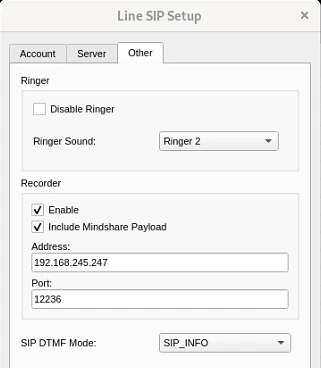
- On the phone line, click Setup SIP and open the Other tab.
- Under Recorder:
- Tick Enable.
- Tick Include Mindshare Payload to send the caller's number and name with the audio.
- Address: the RockRecorder server's IP address.
- Port: the port you gave this line's channel in step 2.
The audio is sent straight to the port (UDP), so any firewall between the consoles and the server must allow those ports.
4. Check it's working
Make a test call on a line. When the call ends, it appears on the Recordings page under the line's channel. With Include Mindshare Payload on, the UID column shows the caller's number and Alias the caller's name. Without it, those are blank.
To show your own names for numbers you know, add them to the alias bank (Administration > Alias Banks > MRadio): an entry there replaces the name the console sends.
Nothing showing up? See A channel has no recordings.
How calls are recorded
- A recording starts when audio arrives on the line's port and ends when it stops. Calls are written to disk as they're recorded, so a long call isn't lost if the server restarts.
- If the console stops sending audio during a call, for example while it's on hold, the call can be saved as more than one recording.
- Very long calls are saved in 4-hour parts.
Optional: call details from the consoles
With Cisco Unified CM, RockRecorder can also read the consoles' call logs and add ring time, who answered, holds, transfers and how the call ended to each recording, plus an MPhone Calls section in Statistics.
To set it up, see Sending Mindshare console logs to RockRecorder.